This document outlines how to enable AVX on a Blackcore system as well as the recommended offsets for the specific AVX instructions.
For help with enabling AVX and to gain access to the AITweaker menu, please contact: [email protected]
TABLE OF CONTENTS
Currently, Blackcore systems are tested with AVX disabled and shipped with AVX disabled. We recommend that clients reach out to us about any AVX workloads they want to run. Due to the nature of the AVX instruction set, there can be more heat generated and more power is usually consumed, which can introduce a variable of instability.
When enabling AVX on a Blackcore system, the following items will need to be monitored:
Before testing AVX on a Blackcore system, it is recommended to get a before-and-after for the stats below
- Package Power draw
This can be measured via "turbostat" - PSU Power Draw
This can be measured per module in the sensor tab of the IPMI - CPU Package / Core Temp
AVX in Linux :
To enable AVX, the "noxsave" command will need to be excluded from the GRUB bootloader.
If "noxsave" is enabled in GRUB, then AVX will be disabled at the kernel level upon OS boot.
IMPORTANT!!
RHEL10 & Rocky10 both require a minimum of base AVX to be enabled to boot into the OS.
All the ICON (Intel-based) Blackcore systems can dynamically change the AVX instruction offsets on the fly.
To do this, the system will need to be in the BIOS with the AI Tweaker password entered. You can request the AI Tweaker password from Blackcore support.
To access the AVX offsets for both the 3100-GM and the 3100-SM+ / SX+, you will have to navigate to "AI Tweaker -> AVX Related Controls".
For Light workloads, the "Ratio offset to per-core" can be set to "Auto"
For heavier workloads, you may require specific offsets. You can find these in the sections below.
3100-GM
The GM systems have AVX enabled in the BIOS as standard. AVX testing is required on the GM systems before it can be cleared for shipping.
The AVX offsets are set to:
Light - 2
Medium - 4
High - 6
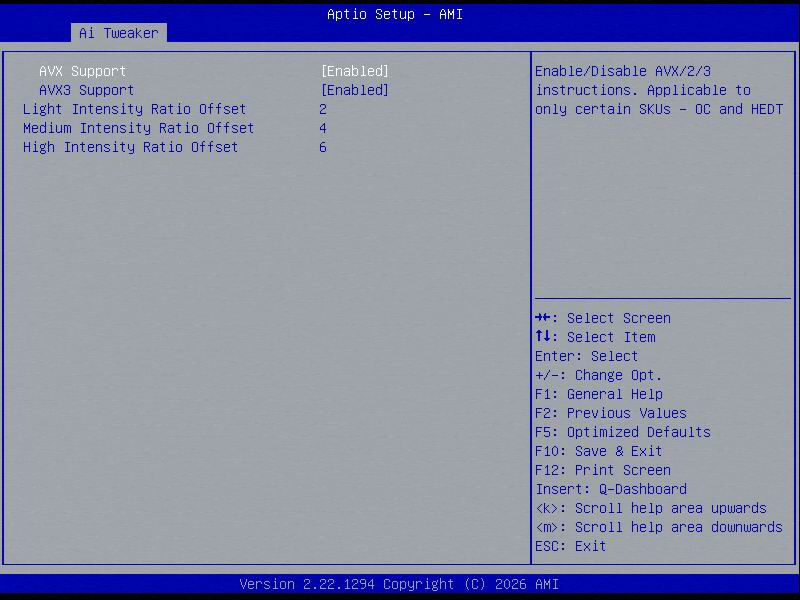
AVX can be disabled on the GM systems by setting AVX support & AVX3 support to disabled.
AVX10
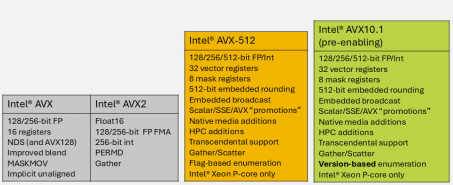
Intel has introduced a new AVX versioning approach, now named Intel AVX10.
Enabling AVX in the 3100-GM BIOS will enable both the AVX and AVX2 instruction sets.
Enabling AVX3 in the 3100-GM BIOS will enable AVX512 and AMX
3100-SM+ / SX+
The 3100-SM+ & SX+ will have AVX disabled by default; AVX is also not one of the testing criteria for the SM+/SX+ before being shipped.
To enable AVX on the 3100-SM+ & SX+, you will have to navigate to AVX Related Controls under AI Tweaker.
The following will need to be set to enabled for AVX to be enabled on the systems
AVX2 - Enabled
AVX512 - Enabled
AMX - Enabled
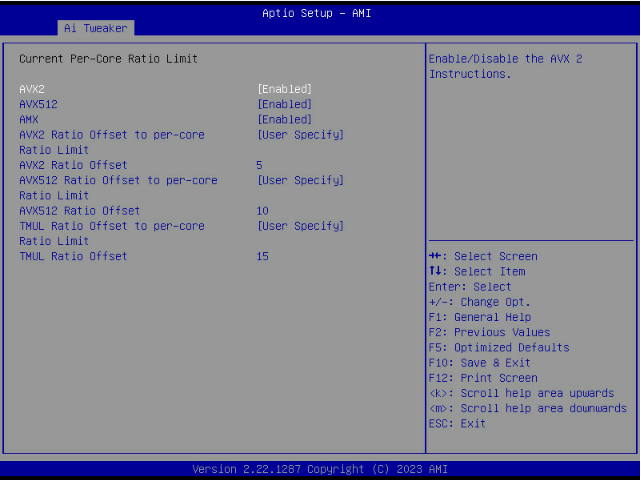
For heavier workloads, we recommend running the following AVX offsets:
AVX2 - 5
AVX512 - 10
TMUL - 15
Sapphire Rapids handles AVX workloads slightly differently from previous generations of Intel Xeon processors. AVX, AVX2 and AVX512 are split into different categories: Light, Medium and Heavy variations of each instruction set.
This can mean that heavy AVX2 workloads can have the AVX512 offset applied.
See the table below for comparison
| Frequency Level Mapping | |||||
| Cdyn Class | 1 | 2 | 3 | 4 | 5 |
| 128 PVP Levels | 128 Light | 128 Heavy | |||
| 256 PVP Levels | 256 Light | 256 Moderate | 256 Heavy | ||
| 512 PCP Levels | 512 Ultra Light | 512 Light | 512 Moderate | 512 Heavy | |
| AMX PVP Levels | AMX Ultra Light | AMX Light | AMX Moderate | AMX Heavy | |
| POnMax | Turbo_Limit_1 | Turbo_Limit_2 | Turbo_Limit_3 | Turbo_Limit_4 | Turbo_Limit_5 |
| SPR TRL Mapping | SSS P0 | AVX2 P0 | AVX512 P0 | AMX P0 | AMX P0 |
| SW interface | TRL level 0 (SSE) | TRL level 1 (AVX2) | TRL level 2 (AVX512) | TRL level 3 (AMX) | TRL level 3 (AMX) |
Was this article helpful?
That’s Great!
Thank you for your feedback
Sorry! We couldn't be helpful
Thank you for your feedback
Feedback sent
We appreciate your effort and will try to fix the article