This guide outlines where to find the Clear CMOS button in Blackcore Systems.
Clearing the CMOS might be a step that is asked of a client during troubleshooting. The document below outlines where the Clear CMOS button is located for each of the different systems Blackcore Technologies supports.
Important! The ICON-3100-RL+ does not have a dedicated Clear CMOS button on the rear of the system.
It will require two pins to be bridged to clear the CMOS.
TABLE OF CONTENTS
ICON
3100-GM

3100-SM+ / SX+
 The motherboards for the SPR-M and SPR-X are the same as those for the SM+ and SX+
3100-RL+
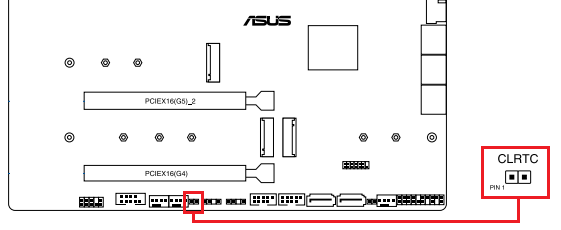
- Turn off the system and remove the power cord
- Short-circuit pins 1-2 with a metal object (screwdriver tip) or a jumper cap for 5-10 seconds
- Plug the power cord back in and power the system back up
ACE
3100-TX / TX+ / TS+

3100-RZ/RZX

Was this article helpful?
That’s Great!
Thank you for your feedback
Sorry! We couldn't be helpful
Thank you for your feedback
Feedback sent
We appreciate your effort and will try to fix the article