You may wish to migrate SSDs between hosts, and retain data and RAID integrity. The below steps outline this process.
Step 1
Turn off the non functional unit with the RAID array.
Please ensure that either the power cables have been removed from the non functional unit or that the power bar supplying power to the unit is turned off remotely.
Step 2
Remove all disk's that are in the RAID array from the non-functional system.
Note: Keep a record of the order the drives were installed in the server. The drives must be re-inserted in the exact same order, otherwise the RAID integrity will be lost and import will not be possible.
Note: You do not need to remove the disks from the drive sleds.
Note: You do not need to remove the RAID Controller from the non-functional system as all of the information about the RAID array should be stored on the disks themselves.
Step 3
Insert the drive sleds into the replacement unit, in the same order they were removed in Step 2.
Step 4
Turn on the replacement unit and enter the BIOS.
Navigate to the RAID card controller menu under the "Advanced" tab.
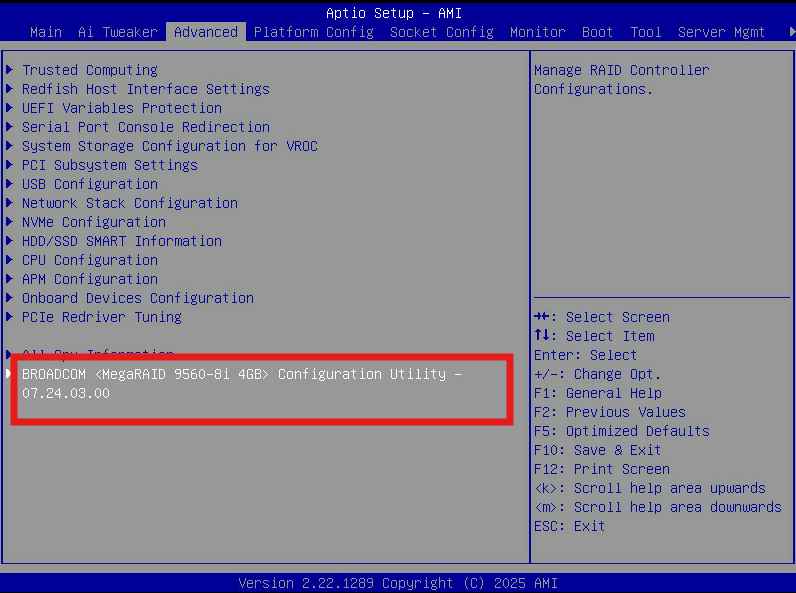
The RAID card will detect the drives, and the RAID configuration and automatically import the array.
You should be able to see your virtual drive listed in the main menu as below:
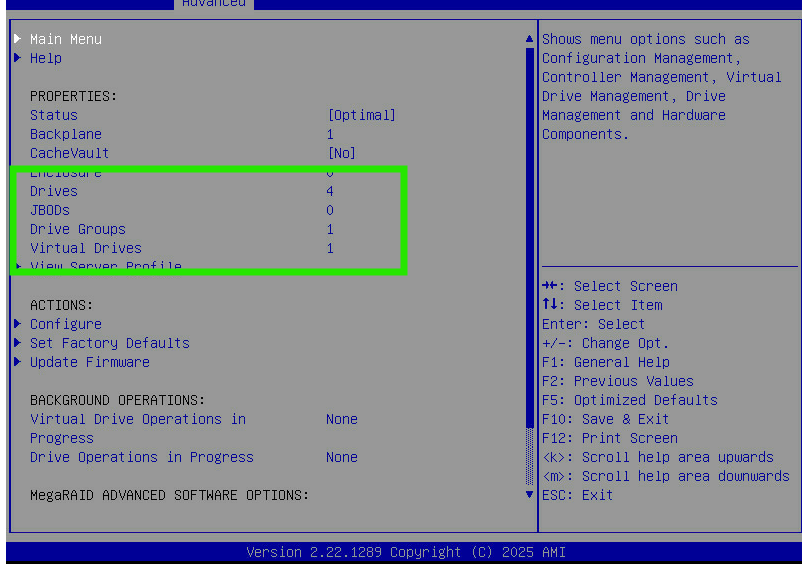
Ensure that the correct number of "Drives" are showing, and the "Status" is "Optimal"
If any drives are missing, please check they have been correctly inserted.
If you have further issues with this please feel free to reach out to Blackcore Support ([email protected]).
Was this article helpful?
That’s Great!
Thank you for your feedback
Sorry! We couldn't be helpful
Thank you for your feedback
Feedback sent
We appreciate your effort and will try to fix the article